


Bible Daily, KJV Bible + Audio
4.61.93K Reviews
App Specs
- Version
- 1.39
- Updated On
- License
- Free
- Downloads
- 5,000,000+
- Developer
- WOOMBIT
- Categories
- Books & Reference
- Platform
- Android, iOS
Screenshots





 Analysis by AppCompare
Ever find yourself needing a little spiritual boost during your day? Well, I’ve been trying out the Bible Daily, KJV Bible + Audio app, and let me tell you, it's like having a pocket-sized preacher right in your phone. Let’s dive into what makes this app a must-have for anyone looking to stay connected to scripture.
What to consider before making it a daily habit
A Bible app can hold personal reading habits, saved passages, and moments of reflection, so I think trust deserves a place in the decision. Bible Daily is made by WOOMBIT and is free to download, with optional in-app purchases ranging from $0.49 to $49.99 per item. That makes the basic cost easy to understand, but I’d still look carefully at any purchase screen before confirming anything, especially if I were setting the phone up for someone else.
The app is rated for Everyone, and it has a 4.7 average from around 32,000 ratings. Those figures suggest many people find it useful, but they don’t answer the personal questions that matter most: whether its reading style suits you, whether you want the King James Version specifically, and whether you’re comfortable using optional extras. I’d treat ratings as a starting point rather than a substitute for checking how the app fits your own routine.
Keep control of the reading experience
One practical strength is that the app lets me adjust text size and background color. That may sound small, but it can make a real difference when reading in dim light, on a bright commute, or for longer stretches. I’d set those preferences before settling into a reading plan, rather than repeatedly changing them mid-session; a comfortable display makes it easier to focus on the passage itself.
Notifications are another choice worth making deliberately. A daily verse can be a welcome prompt, but it can also become one more alert competing for attention. I’d start with the reminder enabled only if I genuinely want a set nudge, then adjust my phone’s notification settings if it feels intrusive. The app’s daily prompt works best as an invitation to pause, not as a replacement for choosing what and when to read.
Where privacy questions matter most
Sharing a verse is different from keeping a private reading routine. Before sending a passage or insight to friends, I’d consider whether I’m comfortable turning a personal moment into a conversation, and I’d check the recipient and the content before tapping share. That’s useful for a study group or a family message, but it is not the same as a private journal; I wouldn’t use sharing as a place to record sensitive personal reflections.
Likewise, I’d approach any optional AI-based or other in-app tools with a little care. The app’s store summary mentions an AI Priest, along with Bible trivia, prayers, and plans, but I would treat an AI response as a prompt for reflection rather than as a final religious authority. If a question has serious personal, pastoral, or theological weight, discussing it with a trusted human adviser is a better fit. I’d also read any on-screen explanation and choices before using a feature that asks for information or invites a purchase.
Worth Reading Before You Choose

Flipboard Shows What News Apps Must Do Beyond the Feed

Switching to Android Auto Means Rethinking Your Driving Routine

Google Calendar Makes a Crowded Week Easier to Manage

Ludo King Makes the Most of the Minutes Between Plans

Baby Panda World Brings Quick Play to Modern Phones, but Its Game Library Feels Busy

ESPN’s Live Game View Makes Following Close Games Easier
I can’t responsibly infer how an app handles personal information just from its reading features, so my own approach is simple: share only what I mean to share, review the choices shown in the app, and keep purchases intentional. That caution doesn’t make the app hard to use; it just keeps the user in charge of the parts of the experience that feel personal.
Features That Stand Out
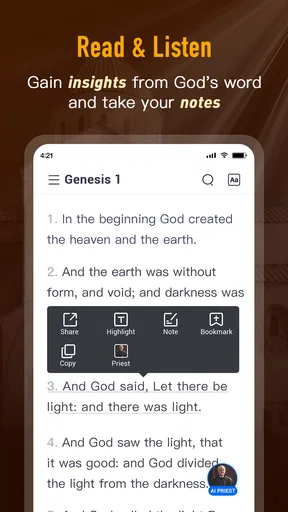
First things first, the Bible Daily, KJV Bible + Audio app offers a comprehensive selection of the King James Version, one of the most beloved Bible translations around. But it’s not just about reading; this app adds a whole new dimension with its audio capabilities. You can listen to the soothing narration of the scriptures, which is perfect for those moments when you’re on the go or just need to rest your eyes.
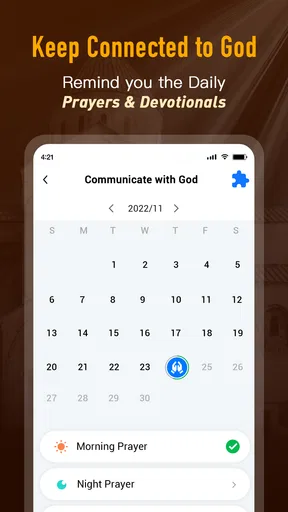
One of the coolest features is the daily verse notification. Every morning, I get a little burst of wisdom delivered straight to my phone. It's a great way to start the day on the right foot, letting those powerful words guide your thoughts right from the get-go.
Easy Navigation and User-Friendly Interface
Alright, let’s talk about usability. The app’s interface is super intuitive. You’ve got your clean layout, easy navigation, and all the tools you need to make scripture study enjoyable. Whether you’re a seasoned Bible scholar or just starting your journey, finding chapters and verses is a breeze.
There’s also a handy search function, so if you remember a snippet of a verse and want to dive deeper, you can find it in seconds. Plus, you can bookmark your favorite passages, making it easy to come back to them whenever inspiration strikes.
Making reading, listening, and search work together
For a useful everyday routine, I’d choose one short passage, read it first, and then use the audio when I’m walking or doing a simple task. Listening is convenient when my eyes are busy, but it’s not ideal if I need to compare wording closely or take careful notes. Switching between reading and listening gives each format a clear job instead of expecting audio to replace focused study.
Search and bookmarks are most helpful when I use them with a little intention. If a line catches my attention, I can search for a phrase I remember and bookmark the passage so I can return to it later. A practical habit is to save only passages I expect to revisit; too many bookmarks can become a second, less-organized reading list. Search is also useful when I know a phrase but not its location, though a remembered fragment may not be exact, so trying a shorter distinctive phrase can be more effective.
Offline reading is part of the app’s stated focus, which can matter on a commute or in a place with unreliable service. I’d prepare before leaving home by opening the text I expect to read and checking that the relevant material is available on my device. That small step avoids relying on a connection at the moment I want a quiet break. For someone who needs a full study library with extensive cross-references and research tools, though, a dedicated study Bible app may be a better match.
Personalization and Community
Now, if you’re like me and love to personalize your reading experience, this app has got you covered. You can adjust the text size and background color to suit your preferences, making those long reading sessions more comfortable.
Plus, there’s a community aspect. You can share verses and insights with friends, fostering a sense of connection and discussion. It’s like having a little Bible study group in your pocket!
Who will get the most from it
I think this app is especially suitable for someone who wants the King James text close at hand and appreciates having reading and audio in one place. It can also work well for a beginner who wants a simple way to open a passage, search for a remembered line, and save a few favorites. A realistic use case is a busy morning: I could read a verse with breakfast, listen to scripture while walking, then return to a bookmarked passage later when I have a quieter moment.
On the other hand, I’d skip it if I wanted a different translation as my main reading text, or if I’m looking for a deep academic reference tool with a broad collection of scholarly resources. People who prefer a paper Bible may also find phone notifications and other app features distracting rather than helpful. Compared with a basic e-book reader, Bible Daily brings scripture-focused tools together; compared with a specialist study platform, its appeal is more about everyday access than detailed research.
The app is free, though optional purchases are available, so I’d begin with the features I actually need and avoid assuming every extra is necessary. It has over 5 million installs, but popularity alone won’t tell you whether the King James Version or the interface is right for you. Its current version is 1.39, and it supports Android 5.0 and later, which is useful to know when checking compatibility on an older device.
Final Thoughts
All in all, the Bible Daily, KJV Bible + Audio app is a fantastic tool for anyone looking to keep the Good Book close by. It's more than just an app; it's a companion for your spiritual journey. Whether you’re reading, listening, or sharing, this app makes it easy to engage with scripture in a meaningful way.
So, if you’re looking for an app that brings the Bible to life and fits seamlessly into your daily routine, give this one a try. You might just find it becoming an essential part of your day.
Pros
- User-friendly interface for easy navigation.
- Offline access to scriptures and audio.
- Daily verse notifications for inspiration.
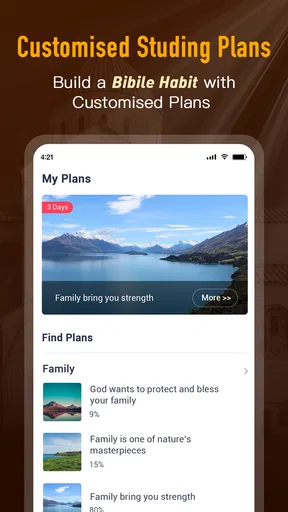
- Customizable reading plans available.
- Text-to-speech feature for hands-free use.
Cons
- Contains ads that can be distracting.
- Limited translation options available.
- No option for personalized bookmarks.
- Audio playback occasionally lags.
- Requires account for full features.
FAQs for Bible Daily, KJV Bible + Audio
What features does the Bible Daily, KJV Bible + Audio app offer?
The Bible Daily app provides a comprehensive experience with access to the King James Version of the Bible in both text and audio formats. Users can easily navigate through the scriptures, bookmark favorite verses, and receive daily devotionals. Additionally, the app includes features like offline access, customizable reading plans, and audio playback for convenience.
Is the Bible Daily, KJV Bible + Audio app free to use?
Yes, the app is free to download and use, offering a wide range of features without cost. However, there may be optional in-app purchases or ads to support the developers. Users can choose to upgrade or remove ads for an enhanced experience, but the core functionalities remain accessible for free.
Can I use the Bible Daily app offline?
Absolutely. The Bible Daily app allows users to download scriptures for offline reading and listening. This feature is particularly beneficial for users who wish to access the Bible without an internet connection, making it perfect for travel or areas with limited connectivity.
How does the audio feature work in the Bible Daily app?
The audio feature provides a seamless listening experience, allowing users to hear the King James Version of the Bible read aloud. Users can control playback speed, set timers for bedtime listening, and even download audio for offline use. This feature is ideal for those who prefer auditory learning or wish to listen while multitasking.
Does the Bible Daily app include any additional study tools?
Yes, the Bible Daily app includes various study tools to enhance your scripture engagement. These tools may comprise verse commentaries, cross-references, and daily devotionals. Users can also create personalized reading plans and track their progress, making it a valuable resource for both casual readers and serious Bible students.


